
Strong Password Generator
Generate secure random passwords instantly with custom settings.
Bulk mode generates five separate passwords at once.
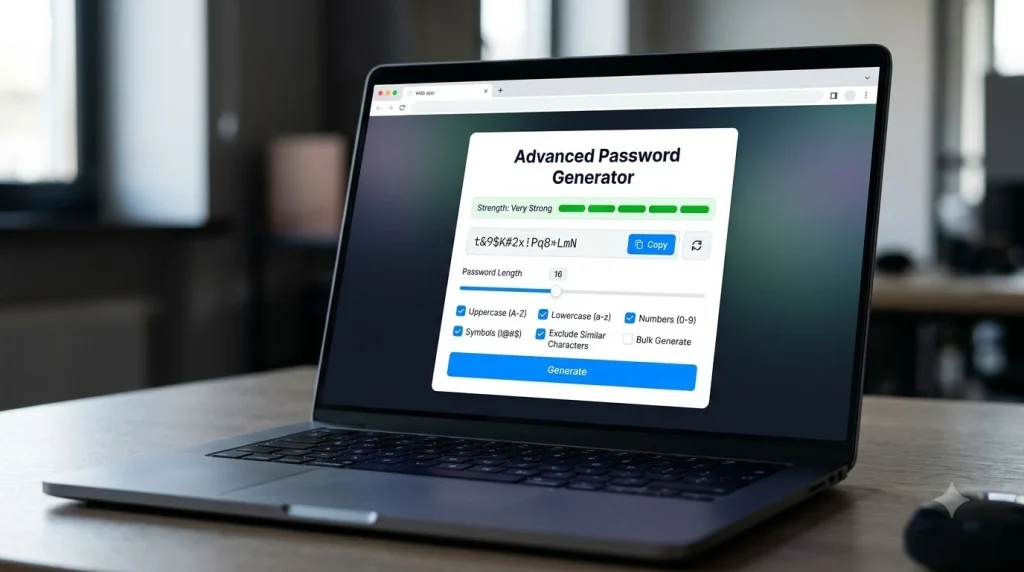
Free Password Generator – Create Strong & Secure Random Passwords
Protecting your online accounts starts with using strong, unpredictable credentials. Using a reliable Free Password Generator allows you to instantly build complex, randomized strings that safeguard your digital identity against automated brute-force attacks.
Free Online Password Generator
The Aanamil.com Strong Password Generator is a free, web-based utility designed to instantly create secure, random passwords directly within your browser. Whether you are setting up a new login or updating personal accounts, this tool removes the guesswork from credential creation. Because password generation runs directly in your browser, you can use this Online Password Generator to create random passwords instantly for free, customize password length and character types, and copy the generated password without installing dedicated software or registering an account.
How to Use the Aanamil Password Generator
Creating a secure password takes only a few simple steps:
- Open the Aanamil Password Generator page.
- Drag the length slider to select your desired character count between 8 and 64 characters.
- Check or uncheck character categories (Uppercase letters, Lowercase letters, Numbers, and Symbols) to meet specific platform rules.
- Enable options like excluding similar characters or bulk generation if needed.
- Click the Generate Password button to build your sequence.
- Click the Copy button to copy the output text directly to your clipboard, subject to your browser’s permissions and functionality.
- Use Reset Settings to return all options to their default configurations.
Customize Your Password
Different platforms enforce unique guidelines for acceptable passwords. The Aanamil tool includes granular customization features to match these requirements:
- Password Length (8–64 Characters): Adjust your password length from 8 to 64 characters. Longer passwords increase the effort required for attackers to guess them through brute-force methods.
- Uppercase Letters (A–Z): Adds capital letters to expand character variance.
- Lowercase Letters (a–z): Includes standard lowercase alphabet letters.
- Numbers (0–9): Integrates numeric digits to diversify the string structure.
- Special Symbols: Adds punctuation and special characters to maximize complexity.
- Exclude Similar Characters: Automatically filters out easily confused characters—such as uppercase I, lowercase l, number 1, uppercase O, and number 0—to prevent manual transcription mistakes.
- No Duplicate Characters: This option prevents the same character from appearing more than once within an individual password. It does not guarantee greater security or uniqueness. Enabling it can limit the available character pool and may restrict the maximum possible password length.
Generate Five Passwords at Once
Managing multiple accounts or updating credentials across various systems can be time-consuming. By checking the Bulk Generate option, the tool immediately generates five passwords simultaneously. The tool generates five passwords, but its code does not check whether two outputs are identical, so they are not guaranteed to be unique or distinct from one another. This allows you to review options or provision several user accounts in one go.
Understanding the Password Strength Meter
Assessing password complexity visually can be challenging. The built-in Password Strength Meter provides an approximate entropy-based strength estimate using password length and the character categories present. It rates security across four levels:
- Weak
- Medium
- Strong
- Very Strong
Note: The strength meter is not a password-cracking test, independent security audit, or guarantee of security. It serves purely as an approximate visual guide based on active parameters.
How the Password Generator Works
When you request a new password, a Random Password Generator script gathers your selected character pools, filters out excluded elements (such as similar characters or duplicates if enabled), and combines them. To help include the selected character categories, the generator attempts to add at least one character from each selected category when possible, then shuffles the resulting characters using cryptographically secure random values.
Is the Aanamil Password Generator Secure?
Privacy and transparency are core design principles of the Aanamil tool:
- Browser-Side Execution: The supplied tool code generates passwords in the browser and contains no routine for uploading or storing generated passwords on Aanamil’s server.
- Cryptographic Randomness: To generate passwords securely, the tool uses cryptographically secure random values through the browser’s crypto.getRandomValues() API in supported secure browser environments.
Disclaimer: While this tool builds robust random passwords, overall account security also depends on maintaining unique credentials across different services, enabling multi-factor authentication (MFA), and utilizing safe storage practices.
Why Use Unique Passwords?
Password reuse remains a primary vulnerability for online accounts. If an attacker compromises your credentials on a low-security website, automated credential-stuffing software can test that exact username and password pair across banking, email, and corporate portals. Using a unique, complex password for every individual service helps prevent a security breach on one site from compromising your accounts on other services.
Frequently Asked Questions
- Is this Password Generator free?
Yes, the tool is completely free to use directly in your browser. - How long can a generated password be?
You can customize your password length anywhere from 8 to 64 characters. - Can I generate five passwords at once?
Yes, enabling the bulk generation mode outputs five passwords at the same time. - Can I exclude similar characters?
Yes, selecting the exclude similar characters option removes confusing glyphs like O, 0, I, l, and 1. - Are passwords sent to a server?
No. Generation takes place locally inside your browser, and the code contains no routine for uploading or storing generated passwords on Aanamil’s server. - Does the tool work on mobile devices?
Yes, the interface is designed to adapt to different screen sizes, while actual compatibility may depend on the user’s browser and device. - Is a generated password guaranteed to be unhackable?
No. Longer, randomly generated passwords can make brute-force guessing significantly more difficult, depending on the attacker’s resources and other security factors. - What makes a password strong?
A strong password should be sufficiently long, randomly generated, and unique to each online service.
More Free Tools from Aanamil
Explore other fast, secure browser utilities designed to simplify your everyday digital tasks:
- Free PDF to Word Converter – Convert portable document files into editable text documents seamlessly.
- Free Image to PDF Converter – Quickly transform image files into clean, professional PDF documents.